

PDF tools
Merge, split, compress and sign PDFs. Files stay with you.
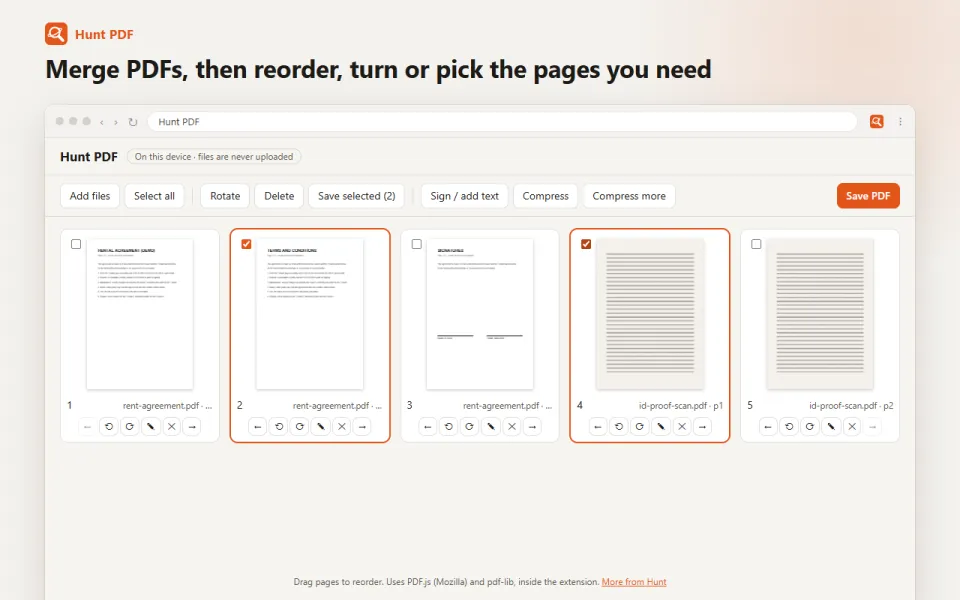
What it does
Merge, split, rotate, reorder, compress, sign and add text to PDFs. Files stay on your computer.
For exampleJoin your Aadhaar and PAN scans into one PDF and sign it.
How to use it
- Click the Hunt button → PDF tools, or open the tools while viewing a PDF.
- Add your files. Photos and scans work too.
- Drag pages into order, rotate or delete them, sign, or add text.
- Press Save PDF. Use Compress for forms with a size limit.
Your privacy
Your files are opened and saved on your computer. They are never uploaded.
Questions
Are my documents uploaded?
No. Everything happens on your computer, so it is safe for ID proofs and agreements.
Can I make a PDF smaller for an online form?
Yes. Compress rewrites the PDF more compactly, and "Compress more" shrinks scanned pages a lot.
Can I sign a PDF?
Yes. Draw your signature, or type your name in a handwriting style, and place it on any page.
Keeping your current browser? Hunt PDF does the same job. See Hunt PDF
You might also like
Study
Notes, flashcards and a quiz from a page, video or PDF.
Screen recording
Record a tab, a window or your screen, with your voice.
Video speed, loop and picture-in-picture
Any video faster or slower, on loop, or in a small window.
PDF tools, built in.
Free in Hunt Browser for Windows and Mac. Nothing else to install.